Imagine you just arrived at site.

The customer is eager to commission. If the logic hasn't been fully tested, the first real test happens in front of them. What if you already knew it works?

Import the project. Do the work. Export it back.

  1. 1

    Import

    One routine at a time on Free; whole projects with their local I/O on Pro.

  2. 2

    Understand

    Read it in the Ladder Viewer, trace any tag through the project, and ask plain-English questions.

  3. 3

    Change

    Edit by hand, or review the AI's proposal rung by rung.

  4. 4

    Prove

    Simulate the routine, the program, or the whole project.

  5. 5

    Export

    Routines and programs on Pro; whole imported projects on Max.

Routine. Program. Whole controller.

Simulation follows the Logix scan model, in a browser tab, with no controller. How it works →

Free

Simulate Routine

Run any routine: toggle inputs, force values, step the scan, and watch power flow through the rungs.

Pro

Simulate Program

The main routine plus every JSR it calls, in one scan.

Max

Simulate Project

The whole controller: continuous, periodic, and event tasks on their own schedules.

Max

Then prove it on the real controller.

With Data Weaver for Windows, Max connects to a CompactLogix or ControlLogix on your bench: monitor it online, and use Live Control for bench tests and FAT. Local connections only. Not a safety device.

About Live Testing

Ask for logic. Weaver creates it. You approve every rung.

  1. Design Decisions. Where your request leaves a real choice open, the plan offers it with the AI's recommendation marked Suggested. Change it, or just approve.
  2. Test-drive in the simulator. Every edit is run, not just checked, and graded against Behavior checks — plain statements of what the change should do.
  3. Accept or discard each change in the Changes Viewer.
  4. Each save is a new revision, and the routine stays marked until you export it.

Pro · AI Pro Programmer Max · AI Expert Programmer

AI output can contain errors. You review it; Studio verifies it.
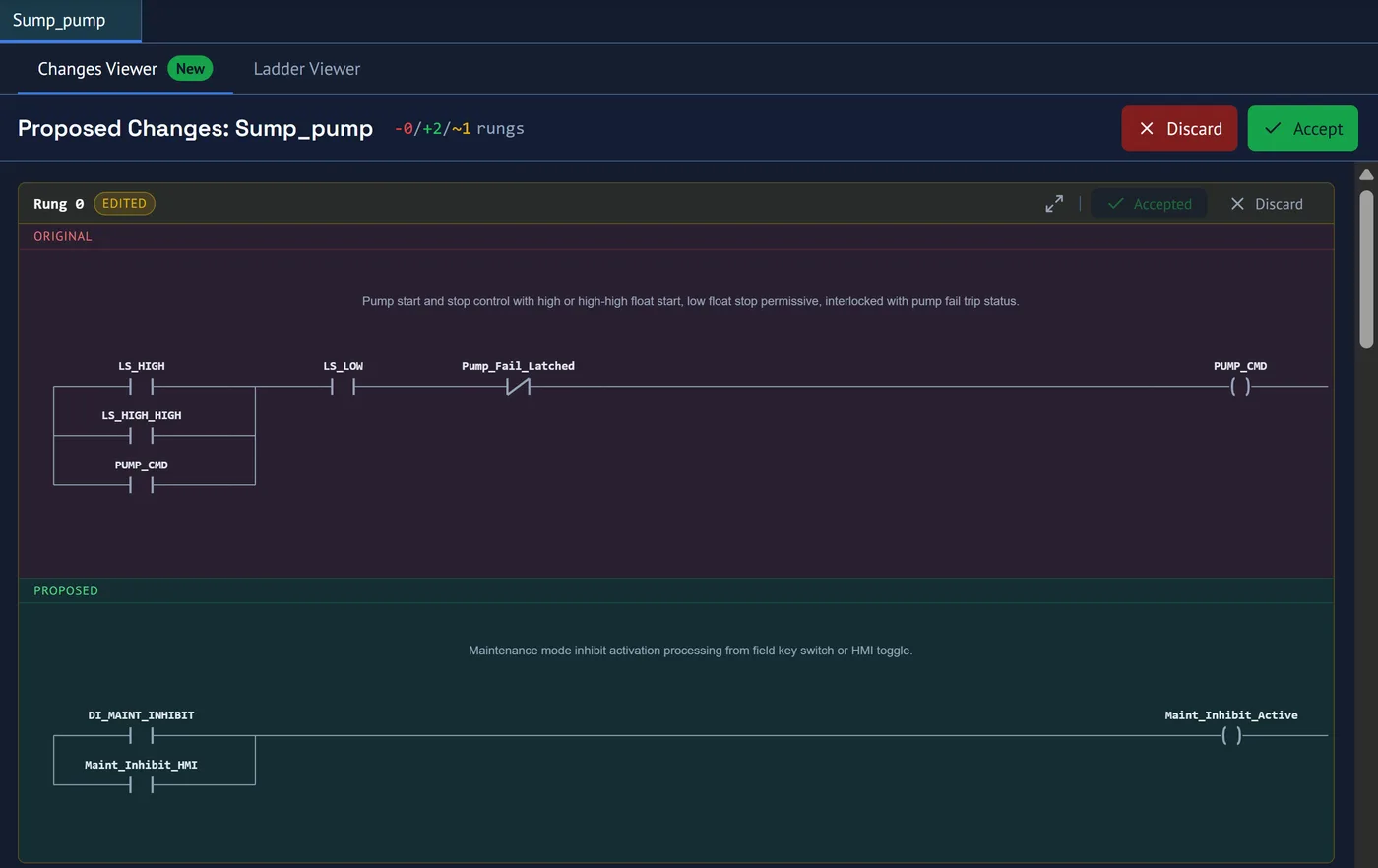
The Changes Viewer for a routine called Sump_pump: rung 0 marked Edited, its original ladder rung drawn above the proposed rung, with Accept and Discard for the rung and for the whole change
The Changes Viewer: every changed rung drawn as ladder, the original above the proposal.

Your logic stays yours.

Exports verified with 0 errors in Studio v36 and run on a 5069-L306ER.

  • AI changes are proposals — nothing lands until you accept it.
  • Every save creates a new revision you can go back to.
  • Encrypted in transit (TLS) and at rest (AES-256).
  • Your code is never used to train AI models.
  • You decide who can open each project. Support access is logged and never routine.